
Download ResizeIt – Free Batch Image Resizer for Windows
Overview of ResizeIt
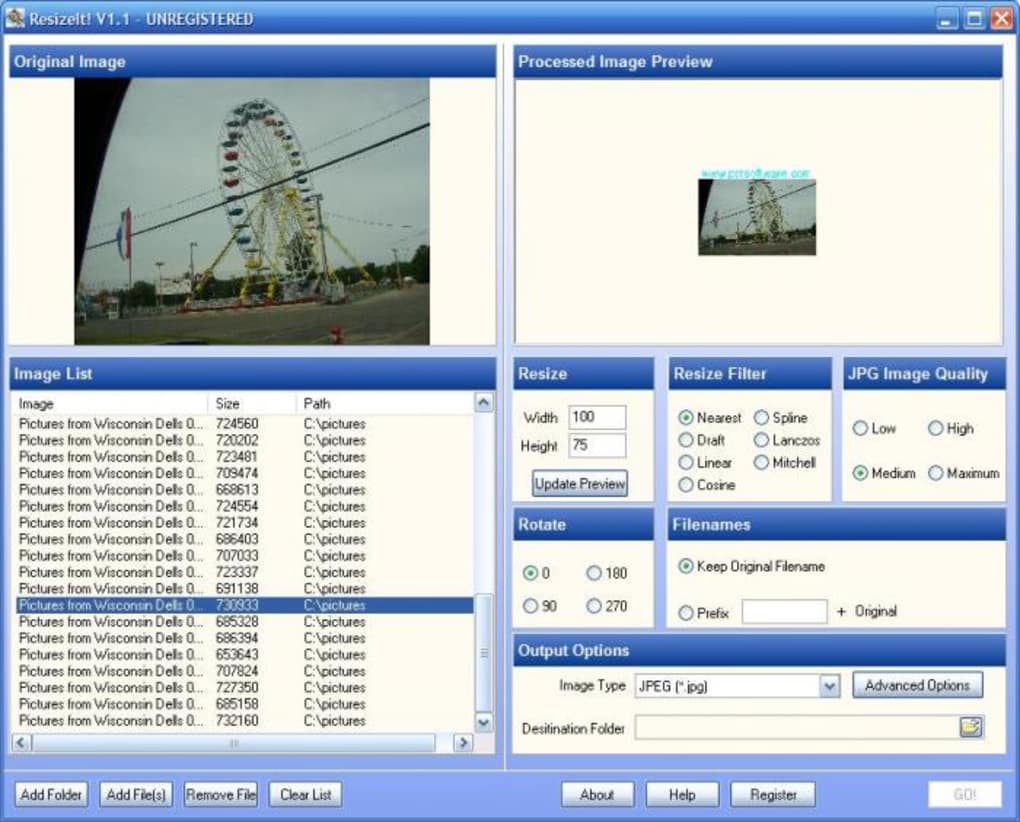
ResizeIt is a lightweight, Windows‑only utility designed for photographers, designers, and anyone who needs to process large numbers of pictures quickly. The trial version (v3.0) focuses on batch resizing, cropping, and basic edits, making it an ideal companion for projects that demand speed without sacrificing quality. First added to our catalog in 2006, ResizeIt has accumulated over 1,400 downloads, with a steady stream of interest from users in the United States and Turkey. Its modest system footprint means it consumes far less disk space than many full‑featured editors, allowing you to keep your workstation lean while still handling tasks such as scaling images for web galleries, preparing print‑ready files, or standardising dimensions for social media. The most recent update (February 18 2008) refined the user interface and added a few hidden shortcuts, ensuring the program remains responsive on legacy systems like Windows 2000 and earlier. Because it is a trial version, users get a taste of the core capabilities before deciding whether to upgrade to a full licence. The interface is straightforward: a main window lists source files, a set of controls defines the target size or percentage, and a preview pane shows the expected outcome. All of this is wrapped in an English‑language UI that feels familiar to anyone who has used classic Windows tools. In short, ResizeIt offers a focused, no‑frills solution for batch image handling, especially for users who prefer a small, secure program that can be downloaded for free and installed in minutes.
Key Features & What Sets ResizeIt Apart
- Batch processing – Resize, crop, and rename dozens of files in a single operation.
- Multiple scaling options – Set exact pixel dimensions, percentage‑based scaling, or fit‑to‑canvas.
- Lossless JPEG handling – Preserve image quality while reducing file size.
- Simple drag‑and‑drop interface – Add files from Explorer without navigating through menus.
- Preview window – See a real‑time thumbnail of the first image after applying settings.
- Support for common formats – JPEG, PNG, BMP, and GIF are all recognized.
- Command‑line support – Automate resizing tasks via scripts for power users.
- Low memory footprint – Runs comfortably on systems with as little as 64 MB RAM.
- International language support – Although the trial is English‑only, the core engine can be localised.
- Free trial – Test all features without a hidden cost, with a clear upgrade path.
The feature set of ResizeIt may appear modest compared with heavyweight suites like Adobe Photoshop, but its narrow focus is precisely what makes it valuable. By eliminating unnecessary layers, filters, and plug‑ins, the program launches in under two seconds, even on older hardware. The batch workflow is driven by a concise dialog: choose a source folder, pick a target size, and hit “Start”. The software then iterates through each file, applying the chosen transformation while preserving the original file name (or adding a suffix if you prefer). For users who need to prepare image sets for e‑commerce sites, portfolios, or email newsletters, this streamlined approach can save hours of manual work. Additionally, the command‑line interface allows IT administrators to embed ResizeIt in larger automation pipelines, such as nightly image optimisation jobs on web servers. The trial version includes a watermark‑free output, so you can assess the final quality before purchasing the full licence. Overall, ResizeIt delivers exactly what its name promises: a fast, reliable way to resize images in bulk, without the bloat of full‑scale editors.
Installation, Usage & Compatibility
Installing ResizeIt is intentionally straightforward. After downloading the installer from the official page, double‑click the ResizeItSetup.exe file. The wizard guides you through a three‑step process: accept the licence agreement, choose an installation folder (the default path works for most users), and click “Install”. Because the program is built for Windows 2000 and earlier versions, it does not require .NET Framework or additional runtimes, which means you can deploy it on legacy machines without worrying about dependency conflicts. Once installed, a shortcut appears on the desktop and in the Start menu. Launching the app opens the main window, where you can immediately start adding images.
To begin a batch job, click the “Add Files” button or simply drag a folder of pictures onto the list area. In the “Resize Options” panel, select one of the predefined size presets (e.g., 800 × 600, 1024 × 768) or enter custom dimensions. If you prefer proportional scaling, switch to the “Percentage” mode and type a value such as 50 % to halve every image. The “Crop” checkbox lets you define a fixed aspect ratio, which is useful for creating uniform thumbnails. After configuring the settings, press “Preview” to view the first image with the new dimensions applied. Satisfied? Hit “Start” and watch the progress bar as ResizeIt processes each file. The output files are saved in a new sub‑folder named “Resized” within the source directory, preserving the originals untouched.
Regarding compatibility, ResizeIt is officially listed for Windows 2000, Windows XP, and earlier Windows releases. It runs natively in 32‑bit environments, and while it can operate on newer 64‑bit versions of Windows, users may need to enable compatibility mode for optimal performance. The software does not have mobile or macOS versions, so it remains a Windows‑centric solution. Its minimal system requirements—approximately 5 MB of disk space and 64 MB of RAM—make it ideal for older workstations, thin clients, or virtual machines that need to handle image batches without draining resources. In summary, the installation process is quick, the user interface is intuitive, and the compatibility scope ensures that even dated PCs can benefit from modern batch‑resizing capabilities.
Conclusion: Pros, Cons, FAQ & How to Get ResizeIt
Pros
- Extremely fast batch processing, even on legacy hardware.
- Very small installation size; minimal impact on system resources.
- Simple drag‑and‑drop workflow reduces learning curve.
- Free trial with full feature access – no hidden limitations.
- Command‑line support for advanced automation scenarios.
Cons
- Only available for Windows; no macOS, Linux, or mobile versions.
- Limited to basic resizing and cropping – no advanced filters or layers.
- Trial version is dated (last update 2008) – may lack modern UI polish.
- No built‑in cloud integration for direct upload to services.
- Support is community‑based; official customer service may be limited.
Frequently Asked Questions
Is ResizeIt truly free to use?
The trial version is completely free and provides access to all core features. To continue using the software after the trial period, you can purchase a licence, but the free version remains functional for basic batch resizing.
Can I resize images larger than the original size?
Yes. ResizeIt allows you to specify custom dimensions that are larger than the source image, though up‑scaling may reduce visual quality. The preview window helps you assess the result before processing.
Does the program support PNG transparency?
PNG files are fully supported, including alpha transparency. The resizing process preserves the transparent background when saving the output.
Can I automate resizing with a script?
Absolutely. ResizeIt includes command‑line parameters that let you specify source folders, target sizes, and output locations, making it suitable for batch jobs run from batch files or scheduled tasks.
Is the software safe and secure to download?
Yes. The installer is digitally signed, and the program has no known malware components. It is hosted on reputable download mirrors and has been used by thousands of Windows users without incident.
If you’re looking for a quick, reliable way to batch‑resize images without the overhead of a full‑blown editor, ResizeIt delivers exactly that. Its straightforward interface, minimal system requirements, and free trial make it an attractive option for hobbyists and professionals alike. To start optimizing your photo library today, click the download button below, install the program, and experience the speed of batch processing for yourself. Remember, the trial version is free, so you can evaluate every feature before deciding on a purchase. Happy resizing!
Download ResizeIt Free






